Last year, we started sending out phishing e-mails on a regular basis. This was to ensure that you think carefully before you click on an e-mail link or enter your login details.
After the very first test in 2020, we started periodic phishing campaigns with our knowledge partner Kembit around the summer holidays.
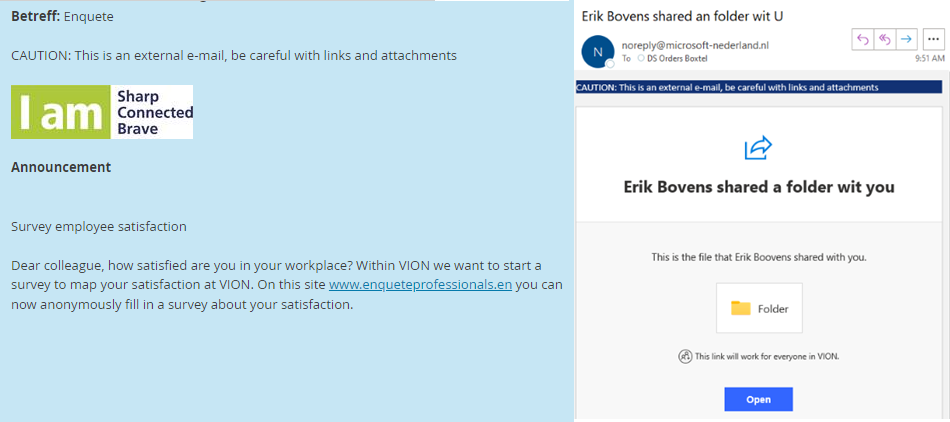
Examples:
The result of regularly carrying out these tests can be clearly seen in the graph in which we report on the number of employees who have opened a test e-mail (double-clicking the e-mail) or clicked on the link.
.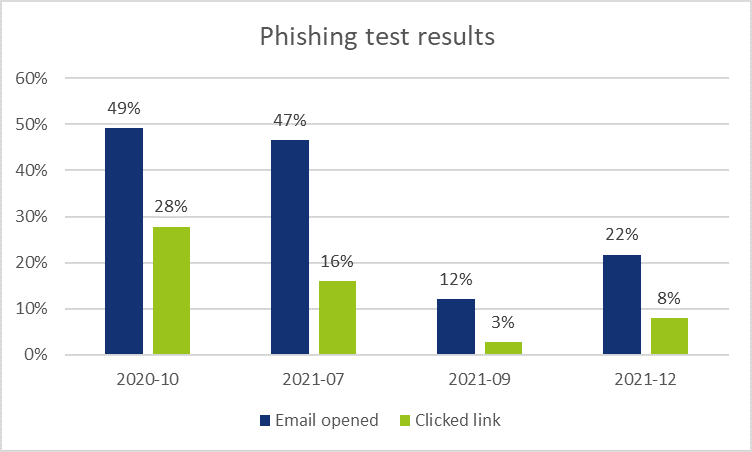
Depending on how difficult it is to recognise the test e-mail as phishing, the results may differ. However, we do see a clear trend that we are all getting better at recognising phishing e-mails.
We will continue with Vion phishing campaigns this year. In addition to recognising phishing e-mails, we will also focus on reporting them via Microsoft Outlook. We would like more employees to report suspicious e-mails and that we respond to these reports even faster and better.
Tip: pay particular attention to external e-mails
A first quick trick to recognise internal Vion e-mails is to look for the following warning bar:

E-mails that are not recognised as Vion internal are always provided with this warning bar. This allows you to quickly distinguish between internal and external e-mails. In almost all cases, external e-mails are the source of a phishing attack. Therefore you can safely click on links in internal e-mails.