30 May 2023
Phishing is and remains one of the most common digital attacks on a company. Even within Vion, we spend a lot of time preventing and blocking phishing emails.
Despite these safeguards, e-mails still get through and reach you, the end user. A phishing email would like to persuade you to enter personal and/or company data. Think of usernames, passwords or credit card details.
What to look out for in phishing emails:
Hackers send emails that often appear to come from a legitimate source. Think Microsoft or Vion itself. Often (but not always), the email itself contains several spelling and language errors. The formatting itself is also often an issue that shows whether it is a phishing email. Think of images that are not properly aligned or pictures instead of actual files.
In addition, often the name does not match the actual email address or it contains spelling mistakes. For example John.doe@vionfoood.com or (john.doe@randomdomain.com). Common trends within phishing that we encounter are invoices ready to go, passwords expired and files shared. Also fairly common are emails in which the hacker pretends to be someone with a high position within the organisation (E.g. CIO or CEO).
You as a user can report e-mails within outlook. You can do this by clicking on the button within the mail overview called report message. You can then tick a reason. This can be spam (Junk), phishing or safe (Not Junk).
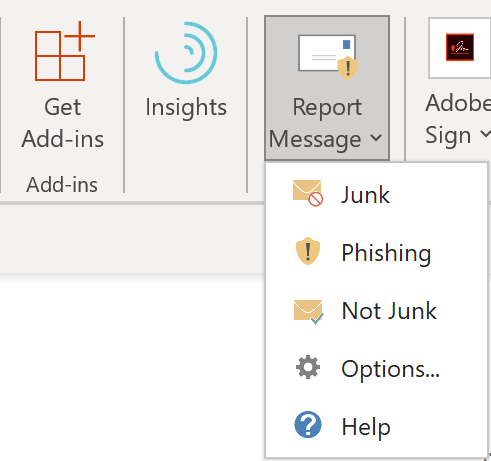
Figure 1 Report phishing email
An example of a phishing mail is shown in Figure 2.
In this phishing mail, a number of things stand out. The most obvious ones are as follows:
• The email address does not match an email address originating from vionfood (however, the name has been changed, which is a common technique).
• The image it contains is a generic image.
• The link behind the image is a link to a (rogue) website. On this website, data can probably be entered or a virus downloaded.
Make sure you always report phishing emails to the security office, so that together we can keep Vion as an organisation as safe as possible.
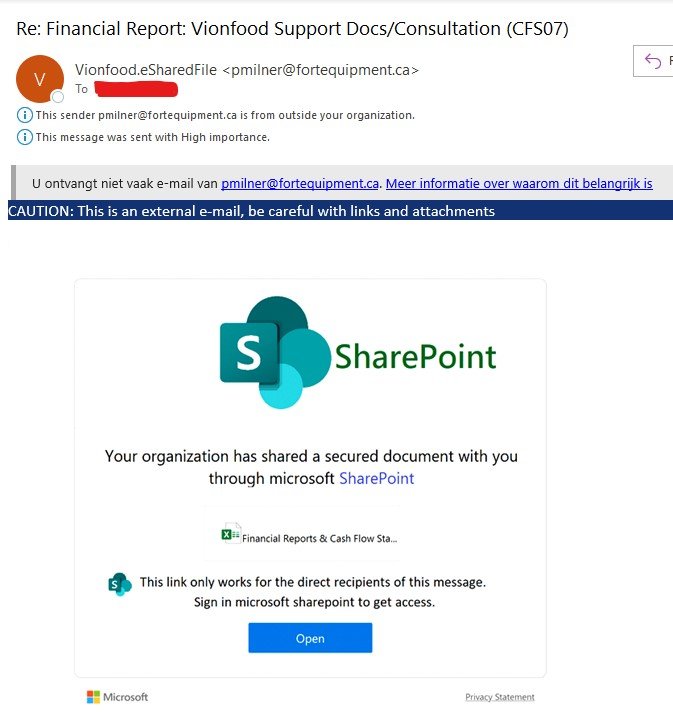
Figure 2 Example of a phishing email