30 May 2023
How does a hacker actually proceed? That obviously depends on the type of phishing email, but let's take the most common example; an email in which you follow a link to enter data in order to open a file or change your password.
1. The hacker sets up a website containing a login page that looks like it comes from the organisation.
2. The hacker sets up an email, possibly using the same domain mentioned in step 1.
3. The hacker often changes the display name of an email, making it appear to come from someone within Vion.
4. If you click on the link (which obviously doesn't happen), you get to the fake login page. This is where you enter your details, causing the hacker to receive them.
5. From here, several steps can happen. Think blackmailing, stealing data, identity fraud or further trying to penetrate further into the organisation.
How does the security office handle this?
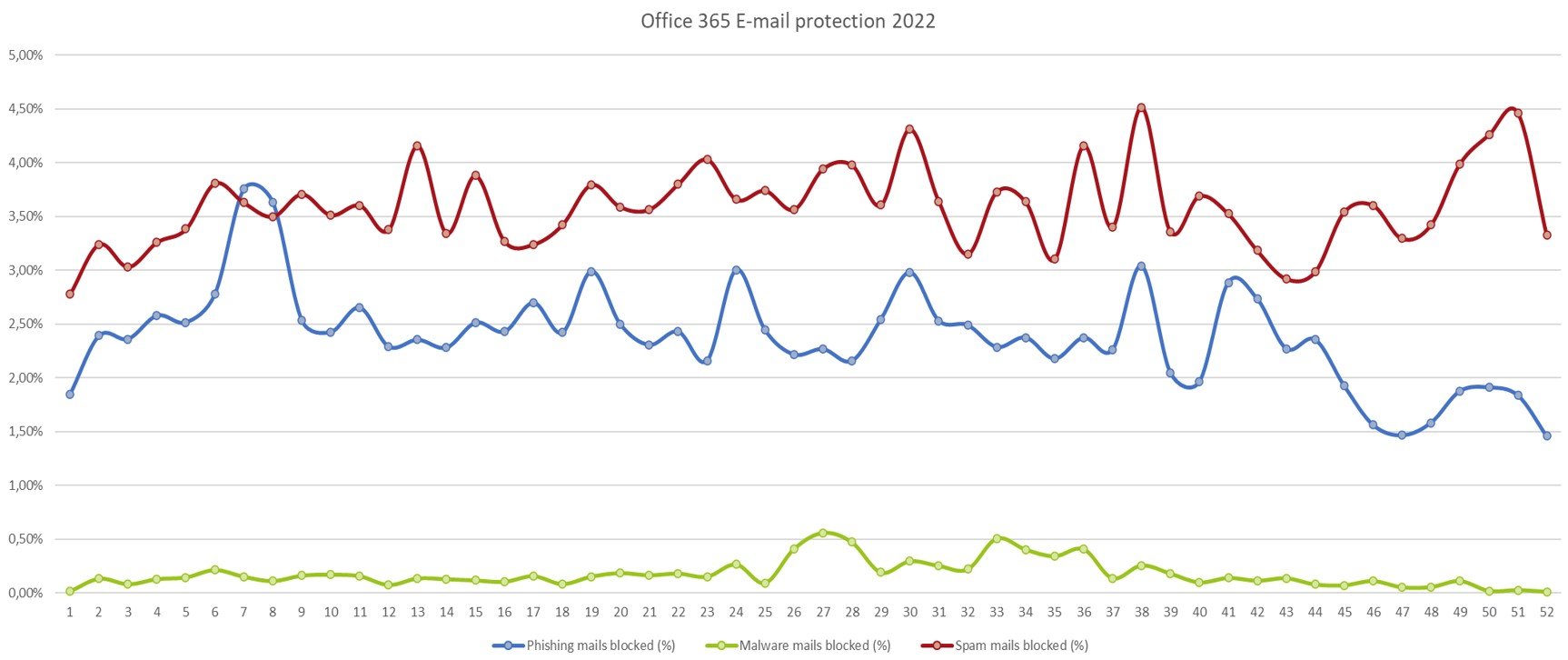
Our Microsoft e-mail environment is continuously protected by automatically blocking suspicious e-mails. On a weekly basis, we as security office keep track of how many e-mails are stopped in this way. In 2022, an average of 7360 e-mails were blocked weekly and marked as spam (58%), phishing (39%) and malware (3%). Figure 3 shows these automatically blocked e-mails.
Apart from these automatic blocks, e-mails still occasionally get through. Reported emails (via the aforementioned button in Outlook) are further analysed by the security office and then classified as phishing, spam or safe.
In addition to Microsoft security, we use a service from Novagraaf that can take further follow-up actions such as contacting internet providers to register mail addresses as rogue or to take entire domains off the air.